Guide
Quick example
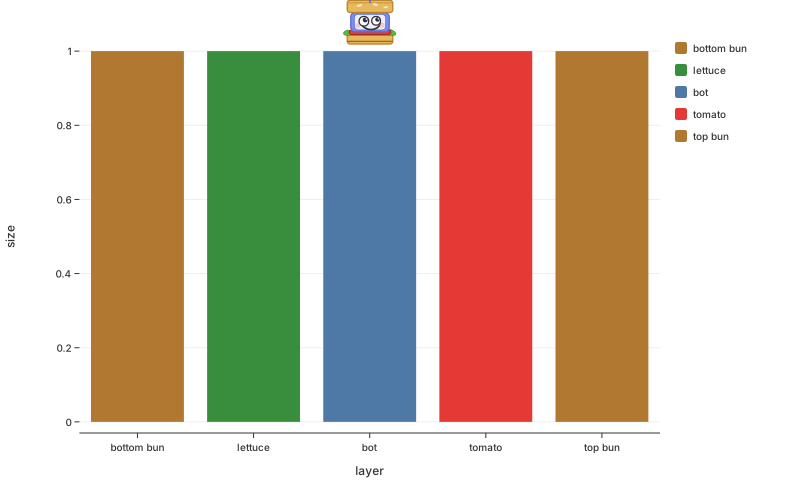
import botplotlib as blt

data = {
    "layer": ["bottom bun", "lettuce", "bot", "tomato", "top bun"],
    "size": [1, 1, 1, 1, 1],
}
fig = blt.bar(
    data, x="layer", y="size", color="layer",
    color_map={"bottom bun": "#B07830", "lettuce": "#388E3C",
               "bot": "#4E79A7", "tomato": "#E53935",
               "top bun": "#B07830"},
)
fig.save_svg("plot.svg")
Themes
| Theme | Alias | Personality |
|---|---|---|
default |
— | general purpose, colorful, fine, whatever |
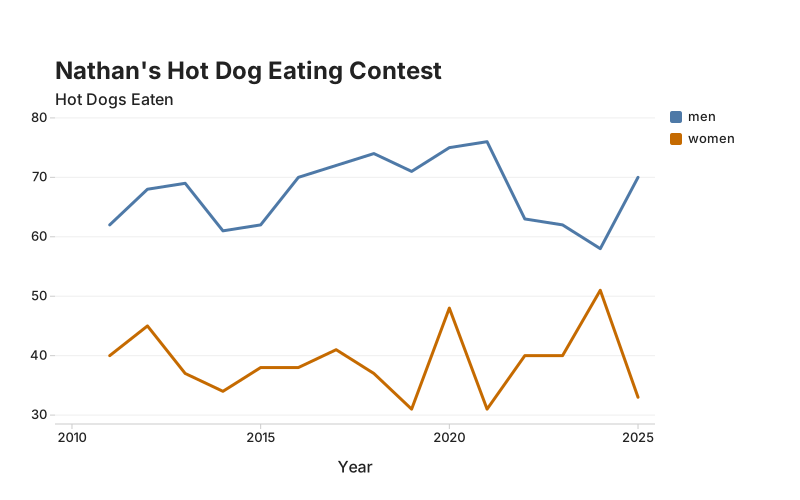
bluesky |
social |
scroll-stopping titles, fat dots for mobile thumbs |
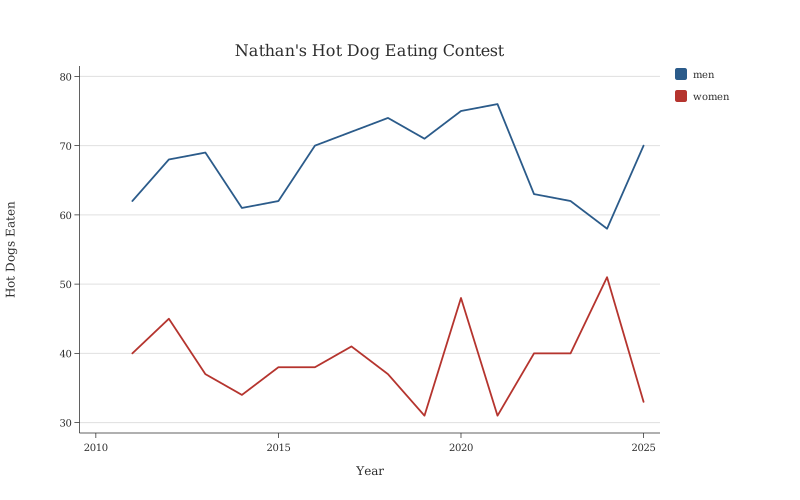
pdf |
arxiv |
academic and restrained, everyone will think u r v smart |
print |
— | sometimes you weirdly still need grayscale |
magazine |
economist |
we all know which magazine it is we're just not gonna say it |
All theme palettes enforce WCAG AA contrast ratios (>= 3:1 against white). This is a compiler error, not a warning. You literally cannot ship inaccessible colors because accountability lives in systems.
import botplotlib as blt

years = list(range(2011, 2026))
data = {
    "year": years * 2,
    "hot_dogs": [62, 68, 69, 61, 62, 70, 72, 74, 71, 75, 76, 63, 62, 58, 70,
                 40, 45, 37, 34, 38, 38, 41, 37, 31, 48, 31, 40, 40, 51, 33],
    "division": ["men"] * 15 + ["women"] * 15,
}
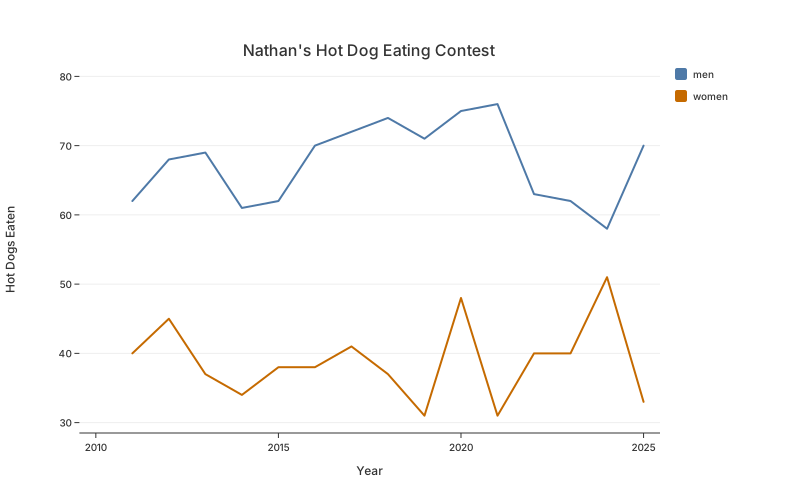
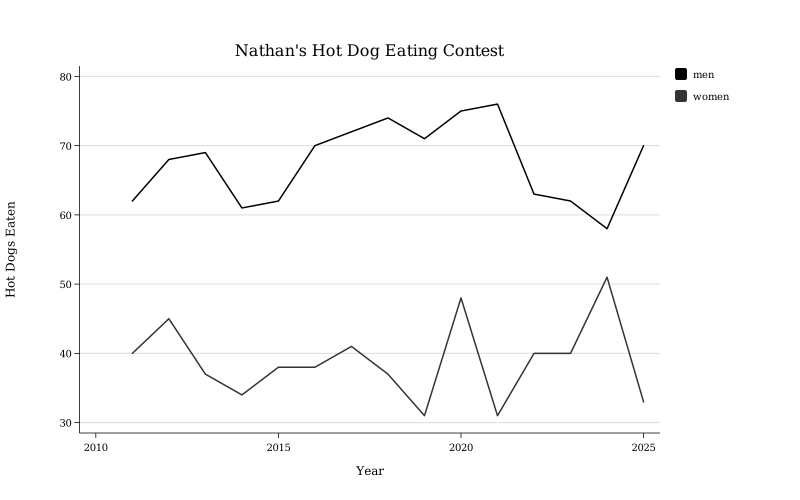
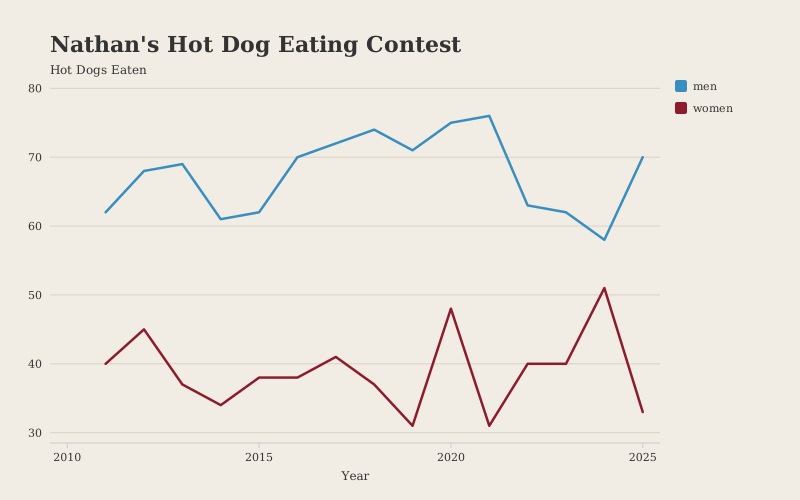
These Data are from Nathan's Famous Hot Dog Eating Contest, Coney Island, every July 4th since 1916.
Default
fig = blt.line(data, x="year", y="hot_dogs", color="division",
               title="Nathan's Hot Dog Eating Contest",
               x_label="Year", y_label="Hot Dogs Eaten")
Bluesky
fig = blt.line(data, x="year", y="hot_dogs", color="division",
               title="Nathan's Hot Dog Eating Contest",
               x_label="Year", y_label="Hot Dogs Eaten",
               theme="bluesky")
PDF
fig = blt.line(data, x="year", y="hot_dogs", color="division",
               title="Nathan's Hot Dog Eating Contest",
               x_label="Year", y_label="Hot Dogs Eaten",
               theme="pdf")
Print
fig = blt.line(data, x="year", y="hot_dogs", color="division",
               title="Nathan's Hot Dog Eating Contest",
               x_label="Year", y_label="Hot Dogs Eaten",
               theme="print")
Magazine
fig = blt.line(data, x="year", y="hot_dogs", color="division",
               title="Nathan's Hot Dog Eating Contest",
               x_label="Year", y_label="Hot Dogs Eaten",
               theme="magazine")
Aliases work too — social and arxiv map to their obvious counterparts. See the API Reference for the full ThemeSpec schema.
Data formats
Pass whatever your pipeline produces and botplotlib figures it out. We're all mad here.
Supported formats:
- Dict of columns —
{"x": [1, 2, 3], "y": [4, 5, 6]}(recommended) - List of dicts —
[{"x": 1, "y": 4}, {"x": 2, "y": 5}] - Polars DataFrame
- Pandas DataFrame
- Arrow Table / RecordBatch
- Generator / iterator — materialized to list of dicts automatically
If a column doesn't exist, the compiler raises a clear ValueError naming the missing column.
JSON path
Agents can generate plots by producing a PlotSpec as JSON — no Python code execution required. Same structural gates (WCAG contrast, validation) apply regardless of who built the spec.
PlotSpec JSON schema
{
    "data": {
        "columns": {
            "column_name": [values...]
        }
    },
    "layers": [
        {
            "geom": "scatter | line | bar | waterfall",
            "x": "column_name",
            "y": "column_name",
            "color": "column_name (optional)",
            "labels": "boolean, default false (optional)",
            "label_format": "string (optional)"
        }
    ],
    "labels": {
        "title": "string (optional)",
        "subtitle": "string (optional)",
        "x": "string (optional)",
        "y": "string (optional)",
        "footnote": "string (optional)"
    },
    "legend": {
        "show": true,
        "position": "top | bottom | left | right"
    },
    "size": {
        "width": 800,
        "height": 500
    },
    "theme": "default | bluesky | pdf | print | magazine"
}
Refactoring from matplotlib
Feed it your matplotlib scripts. The translation is often shorter than the import block it replaces.
from botplotlib.refactor import to_botplotlib_code

bpl_code = to_botplotlib_code("""
import matplotlib.pyplot as plt
import numpy as np

x = [0, 1, 2, 3, 4, 5]
y = [0, 1, 4, 9, 16, 25]

plt.figure(figsize=(8, 5))
plt.scatter(x, y)
plt.title("x squared")
plt.xlabel("x")
plt.ylabel("x^2")
plt.savefig("old_plot.png")
""")

print(bpl_code)
Output:
import botplotlib as blt

fig = blt.scatter(
    {"x": [0, 1, 2, 3, 4, 5], "y": [0, 1, 4, 9, 16, 25]},
    x="x",
    y="y",
    title="x squared",
    x_label="x",
    y_label="x^2",
)
fig.save_svg("plot.svg")
You can also extract a PlotSpec directly: